Five categories. One transparent score.
RSAI shows the evidence, points earned, market context, and practical next step behind every category.
Google Business Profile
RSAI checks verification, business information, category relevance, merchant photos, menus, action links, and the profile signals Google recommends keeping complete.
Reviews
Review volume, rating, recent activity, response coverage, and how quickly the restaurant responds to customers.
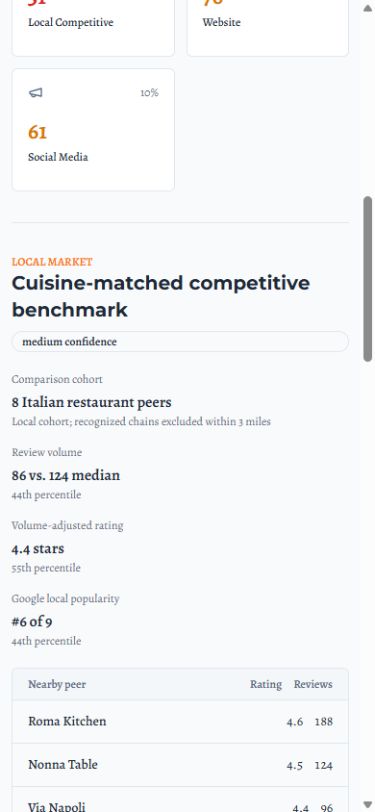
Local Competition
A ranked list of the nearby restaurants that serve the same food, with their ratings and review counts, and where you sit among them on Google.
Website & Menu
Does it load fast on a phone (Google’s own speed test), show your menu, take orders and reservations, match your Google details, and cover the basics: title, description, heading, phone, hours and address on the homepage.
Facebook & Instagram
Posting cadence, profile completeness, and visual consistency across your social presence.
Three steps. About a minute.
Find your restaurant
Enter the restaurant name and location. No login, credit card, or Google Business Profile ownership is required.
See the public preview
About 20 seconds, step by step: Google profile, nearby competition, your website, page speed, scoring. You get a score, the competitor leaderboard, what each gap costs you, and a link you can send to a partner.
Unlock the free full report
Create a free account to save every finding, see where diners in each nearby neighborhood find you, and get a fix for each one: a page in RSAI that changes it, ready-to-paste text built from your own Google details, or the AI Web Builder.
The report and working restaurant tools are included free.
Create an account after your preview to keep the full report and use these limits. Upgrade only when you want RSAI to manage, automate, or expand the work.
Your free audit report
Complete five-part report card with every point calculation
Exact-cuisine local competitor benchmark and visibility grid
Prioritized findings, practical fixes, and matching RSAI solutions
Saved report in your dashboard plus 1 fresh report each month
Your free RSAI tools
1 active digital menu and up to 4 total menu drafts
Up to 10 categories and 50 items per active menu
Public menu page and QR code generation
5 AI menu enhancements each month
1 AI menu import and 1 menu-import service order each month
1 TV menu screen rotating up to 3 slides
Free dashboard and basic analytics
Free means $0 with no credit card. Your report is not shortened, blurred, or held back after signup.
Common questions, straight answers.
Do I need to sign in with Google or own the GBP?
Is my data safe?
Do I have to pay anything?
How is the Online Presence Score calculated?
What if I don't have a Facebook or Instagram page?
What does "Where you can gain points" mean?
Can I share the preview?
How do you measure page speed?
Do you tell me how much money I am losing?
How long does the audit take?
What if I don't have a GBP (Google Business Profile)?
If your restaurant doesn't have a Google Business Profile yet, here's how to create, claim, and verify one — it's free and takes about 10 minutes:
- Check if your business already exists: Go to google.com/business and search for your restaurant name and address. Google may have automatically created a listing from public data.
- Claim an existing listing: If you find your restaurant, click "Claim this business" and follow the prompts to prove you're the owner.
- Create a new listing: If your restaurant doesn't appear, click "Add your business to Google" and enter your restaurant name, category (Restaurant), address, phone number, and website.
- Verify your business: Google will ask you to verify ownership — usually by postcard (5-7 days), phone call, or email. Some businesses qualify for instant verification. Visit Google's verification guide for the full process.
- Run the RSAI report now: You can select the public Google listing and receive the report without owning or connecting the profile. Connect it later after Google verifies ownership to add owner-only evidence and management tools.
The entire process is free. A verified, complete Google Business Profile is one of the most important foundations for helping nearby customers find accurate information about your restaurant.
Find your biggest online opportunities.
Start with the public preview before signup. Then create a free RSAI account to keep every calculation, same-cuisine benchmark, recommendation, and included restaurant tool. No credit card and no GBP ownership required.
Find My Restaurant Free